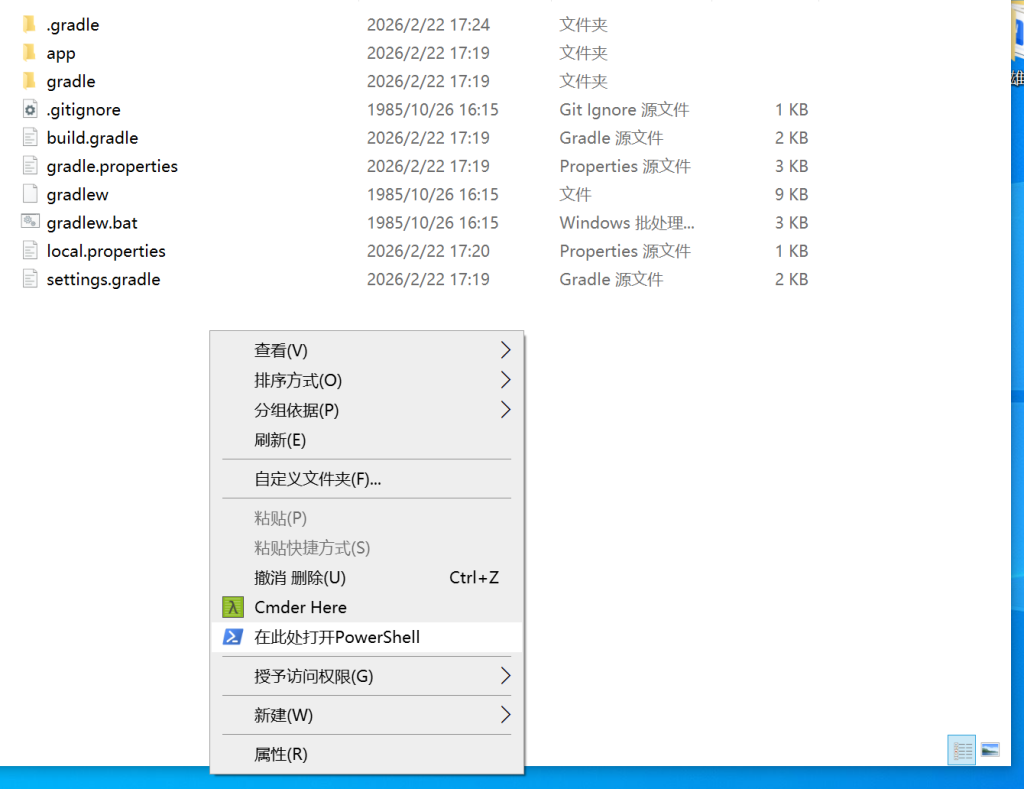









今日观点:Windows 将PowerShell 添加至右键菜单
Windows 将PowerShell 添加至右键菜单 新建一个.reg文件,复制一下内容 右键.reg文件 点击 合并 即可

命令行生成私钥和自签名证书 参数说明: -x509:指定生成自签名证书。-nodes:不对私钥加密。-days 365:证书有效期为 365 天。-newkey rsa:2048:生成一个新的 RSA 密钥。-keyout:指定私钥输出路径...

腾讯云服务器,通过我们的代理购买低至 1 折,点击图片了解详情 腾讯云服务器,通过我们的代理购买低至 1 折,点击图片了解详情 腾讯云服务器,通过我们的代理购买低至 1 折,点击图片了解详情
Python通过REST API向wordpress插入文章 先安装REST API Authentication for WP – JWT Auth, Basic Auth 插件, 插件市场搜索Basic Auth 橘色圆形图...
递归上传整个文件夹到 SFTP 服务器""" 递归上传整个文件夹到 SFTP 服务器 参数: local_path : 本地文件夹路径 remote_path : 远程服务器目标路径 hostname : 服务器主机名/IP usernam...
"""上传文件到宝塔面板的FTP服务器特别处理宝塔的目录名称限制:param base_dir: 本地基础目录:param ftp_config: FTP配置字典"""
遍历基础目录,查找并处理所有ZIP文件 """遍历基础目录,查找并处理所有ZIP文件1. 如果目录中已有多个文件(>1),则跳过解压并删除ZIP2. 否则解压ZIP到当前目录并删除原始ZIP:param base_dir: 要扫描的基础目录...
欢迎使用 WordPress。这是您的第一篇文章。编辑或删除它,然后开始写作吧!

Windows 将PowerShell 添加至右键菜单

新建一个.reg文件,复制一下内容
Windows Registry Editor Version 5.00
[HKEY_CLASSES_ROOT\Directory\Background\shell\PowerShellHere]
@="在此处打开PowerShell"
"Icon"="powershell.exe,0"
[HKEY_CLASSES_ROOT\Directory\Background\shell\PowerShellHere\command]
@="C:\\Windows\\System32\\WindowsPowerShell\\v1.0\\powershell.exe -NoExit -Command Set-Location '%V'"
右键.reg文件 点击 合并 即可
命令行生成私钥和自签名证书
openssl req -x509 -nodes -days 365 -newkey rsa:2048 -keyout localhost.key -out localhost.crt
参数说明:
-x509:指定生成自签名证书。
-nodes:不对私钥加密。
-days 365:证书有效期为 365 天。
-newkey rsa:2048:生成一个新的 RSA 密钥。
-keyout:指定私钥输出路径。
-out:指定证书输出路径。
在提示符下,输入证书信息
国家:填写CN
州/省:填写ShandDong(根据自身情况填写即可)
市:填写QingDao(根据自身情况填写即可)
组织:填写公司名称英文即可(根据自身情况填写即可)
组织单位:填写部门名称英文即可(根据自身情况填写即可)
公共名称:对于本地开发,Common Name 应设置为 localhost
电子邮件: (根据自身情况填写即可)
Nginx config
server {
listen 443 ssl;
server_name test.cn;
root "D:/phpstudy_pro/WWW";
ssl_certificate D:/phpstudy_pro/Extensions/Nginx1.15.11/conf/ssl/test.cn.pem;
ssl_certificate_key D:/phpstudy_pro/Extensions/Nginx1.15.11/conf/ssl/test.cn.key;
location / {
index index.php index.html;
}
location ~ .php(.*)$ {
fastcgi_pass 127.0.0.1:9007;
fastcgi_index index.php;
fastcgi_split_path_info ^((?U).+.php)(/?.+)$;
fastcgi_param SCRIPT_FILENAME $document_root$fastcgi_script_name;
fastcgi_param PATH_INFO $fastcgi_path_info;
fastcgi_param PATH_TRANSLATED $document_root$fastcgi_path_info;
include fastcgi_params;
}
}
Python通过REST API向wordpress插入文章
先安装REST API Authentication for WP - JWT Auth, Basic Auth 插件, 插件市场搜索Basic Auth 橘色圆形图标, 安装完成 点击配置 获取Authorization Basic
def request_create_post_api(title, cid, content, imgUrl):
# 配置信息
site_url = '' #wordpress 地址 http://dojava.cn
url = f"{site_url}/wp-json/wp/v2/posts"
headers = {
"Content-Type": "application/json",
"Authorization": "Basic YWRtaW46YXNkMTIzNDU1" # 使用Basic Auth
}
data = {
"title": "文章标题",
"content": "文章内容",
"status": "publish",
"categories": [cid,cid], # 分类ID
"featured_media": upload_image_from_url(imgUrl)
}
response = requests.post(url, json=data, headers=headers)
print("post创建结果==", response.json())
return response.json()
封面图上传 返回媒体ID
def upload_image_from_url(image_url, alt_text="文章封面图"):
"""
从远程URL直接上传图片到WordPress媒体库
返回媒体ID
"""
try:
# 从环境变量获取配置
site_url = '' #wordpress 地址 http://dojava.cn
# 获取图片信息
head_response = requests.head(image_url, allow_redirects=True, timeout=10)
head_response.raise_for_status()
# 从响应头获取内容类型
content_type = head_response.headers.get('Content-Type', 'image/jpeg')
# 生成唯一文件名
parsed_url = urlparse(image_url)
filename = os.path.basename(parsed_url.path) or f"{uuid.uuid4()}.jpg"
# 下载图片内容
response = requests.get(image_url, stream=True, timeout=30)
response.raise_for_status()
# 准备上传请求
upload_url = f"{site_url}/wp-json/wp/v2/media"
headers = {
'Authorization': 'Basic YWRtaW46YXNkMTIzNDU1',
'Content-Disposition': f'attachment; filename="{filename}"',
'Content-Type': content_type
}
# 直接上传图片内容
upload_response = requests.post(
upload_url,
headers=headers,
data=response.content
)
upload_response.raise_for_status()
# 处理响应
media_data = upload_response.json()
media_id = media_data['id']
print(f"✅ 远程图片上传成功! ID: {media_id} | URL: {image_url}")
return media_id
except requests.exceptions.RequestException as e:
print(f"❌ 远程图片上传失败: {str(e)} | URL: {image_url}")
return None
except Exception as e:
print(f"❌ 其他错误: {str(e)}")
return None
递归上传整个文件夹到 SFTP 服务器
"""
递归上传整个文件夹到 SFTP 服务器
参数:
local_path : 本地文件夹路径
remote_path : 远程服务器目标路径
hostname : 服务器主机名/IP
username : 用户名
password : 密码
port : SSH端口 (默认22)
"""
import os
import paramiko
from stat import S_ISDIR
def upload_folder_sftp(local_path, remote_path):
"""
递归上传整个文件夹到 SFTP 服务器
参数:
local_path : 本地文件夹路径
remote_path : 远程服务器目标路径
hostname : 服务器主机名/IP
username : 用户名
password : 密码
port : SSH端口 (默认22)
"""
LOCAL_DIR = "img" # 本地文件夹路径
REMOTE_DIR = "/www/wwwroot/default/img" # 远程目标路径
hostname = "0.0.0.0" # 服务器地址
username = "root" # 用户名
password = "password" # 密码
port = 22
print("开始上传文件夹...", local_path, "到", remote_path)
# 创建SSH客户端
ssh = paramiko.SSHClient()
ssh.set_missing_host_key_policy(paramiko.AutoAddPolicy())
try:
# 连接服务器
ssh.connect(hostname, port, username, password)
sftp = ssh.open_sftp()
print(f"开始上传: {local_path} -> {hostname}:{remote_path}")
# 确保远程根目录存在
try:
sftp.stat(remote_path)
except FileNotFoundError:
sftp.mkdir(remote_path)
# 遍历本地文件夹
for root, dirs, files in os.walk(local_path):
# 计算相对路径
rel_path = os.path.relpath(root, local_path)
remote_dir = os.path.join(remote_path, rel_path).replace('\\', '/')
# 确保远程目录存在
try:
sftp.stat(remote_dir)
except FileNotFoundError:
print(f"创建目录: {remote_dir}")
sftp.mkdir(remote_dir)
# 上传文件
for file in files:
local_file = os.path.join(root, file)
remote_file = os.path.join(remote_dir, file).replace('\\', '/')
print(f"上传: {local_file} -> {remote_file}")
sftp.put(local_file, remote_file)
print("上传完成!")
return True
except Exception as e:
print(f"上传失败: {str(e)}")
return False
finally:
# 确保连接关闭
sftp.close() if 'sftp' in locals() else None
ssh.close() if ssh else None
# 使用示例
if __name__ == "__main__":
# 配置信息
LOCAL_DIR = "img" # 本地文件夹路径
REMOTE_DIR = "/www/wwwroot/default/img" # 远程目标路径
# 执行上传
upload_folder_sftp(LOCAL_DIR, REMOTE_DIR)
"""
上传文件到宝塔面板的FTP服务器
特别处理宝塔的目录名称限制
:param base_dir: 本地基础目录
:param ftp_config: FTP配置字典
"""
import os
import ftplib
from pathlib import Path
import re
import time
import logging
# 配置日志
logging.basicConfig(
level=logging.INFO,
format='%(asctime)s - %(levelname)s - %(message)s',
handlers=[
logging.FileHandler("ftp_upload.log"),
logging.StreamHandler()
]
)
logger = logging.getLogger("BaoTaFTP")
def upload_to_baota_ftp(base_dir="images", ftp_config=None):
"""
上传文件到宝塔面板的FTP服务器
特别处理宝塔的目录名称限制
:param base_dir: 本地基础目录
:param ftp_config: FTP配置字典
"""
base_path = Path(base_dir)
if not base_path.exists():
logger.error(f"目录不存在: {base_path}")
return
# 验证配置
required_keys = ['host', 'port', 'user', 'passwd', 'remote_dir']
if not ftp_config or not all(key in ftp_config for key in required_keys):
logger.error("FTP配置不完整")
return
# 收集所有文件
file_list = []
for root, _, files in os.walk(base_path):
for file in files:
# 跳过ZIP文件
if file.lower().endswith('.zip'):
continue
local_path = Path(root) / file
relative_path = local_path.relative_to(base_path)
file_list.append((local_path, relative_path))
if not file_list:
logger.info("未找到可上传的文件")
return
logger.info(f"找到 {len(file_list)} 个文件,开始上传到宝塔FTP...")
uploaded_count = 0
skipped_count = 0
try:
# 连接宝塔FTP
with ftplib.FTP() as ftp:
ftp.connect(ftp_config['host'], ftp_config.get('port', 21))
ftp.login(ftp_config['user'], ftp_config['passwd'])
ftp.set_pasv(True) # 宝塔通常需要被动模式
logger.info(f"已连接到宝塔FTP: {ftp_config['host']}")
# 确保基础目录存在
try:
ftp.cwd(ftp_config['remote_dir'])
except ftplib.error_perm as e:
logger.warning(f"基础目录不存在,尝试创建: {ftp_config['remote_dir']}")
try:
ftp.mkd(ftp_config['remote_dir'])
ftp.cwd(ftp_config['remote_dir'])
except:
logger.error(f"无法创建基础目录: {str(e)}")
return
# 处理每个文件
for local_path, relative_path in file_list:
# 宝塔要求:路径中不能有中文和特殊字符
clean_relative = clean_path_for_baota(relative_path)
# 分离目录和文件名
remote_dir = Path(ftp_config['remote_dir']) / clean_relative.parent
remote_file = clean_relative.name
# 创建远程目录
dir_created = False
try:
# 尝试切换到目录
ftp.cwd(str(remote_dir))
except:
# 递归创建目录
current_remote = Path(ftp_config['remote_dir'])
for part in clean_relative.parent.parts:
# 宝塔要求:目录名必须是英文、数字和下划线
clean_part = re.sub(r'[^a-zA-Z0-9_]', '_', part)
clean_part = clean_part[:50] # 宝塔目录名长度限制
current_remote = current_remote / clean_part
try:
ftp.cwd(str(current_remote))
except:
try:
ftp.mkd(str(current_remote))
ftp.cwd(str(current_remote))
logger.info(f"创建宝塔目录: {current_remote}")
dir_created = True
except Exception as e:
logger.error(f"目录创建失败 [{current_remote}]: {str(e)}")
skipped_count += 1
continue
# 上传文件
try:
with open(local_path, 'rb') as f:
# 宝塔要求:文件名不能有特殊字符
clean_filename = re.sub(r'[^a-zA-Z0-9_\.\-]', '_', remote_file)
clean_filename = clean_filename[:100] # 宝塔文件名长度限制
# 检查文件是否已存在(宝塔可能不允许覆盖)
try:
file_size = ftp.size(clean_filename)
if file_size > 0:
logger.warning(f"文件已存在,跳过: {clean_filename}")
skipped_count += 1
continue
except:
pass # 文件不存在,继续上传
ftp.storbinary(f"STOR {clean_filename}", f)
logger.info(f"上传成功: {relative_path} -> {remote_dir}/{clean_filename}")
uploaded_count += 1
# 宝塔可能需要一点时间处理文件
time.sleep(0.1)
except Exception as e:
logger.error(f"上传失败 [{relative_path}]: {str(e)}")
skipped_count += 1
except Exception as e:
logger.error(f"FTP连接错误: {str(e)}")
# 输出结果
logger.info("\n===== 宝塔FTP上传完成 =====")
logger.info(f"文件总数: {len(file_list)}")
logger.info(f"成功上传: {uploaded_count}")
logger.info(f"跳过/失败: {skipped_count}")
def clean_path_for_baota(path):
"""
为宝塔面板清理路径
:param path: Path对象
:return: 清理后的Path对象
"""
# 宝塔要求:路径中不能有中文和特殊字符
cleaned_parts = []
for part in path.parts:
# 移除中文和非ASCII字符
cleaned = re.sub(r'[^\x00-\x7F]', '', part)
# 只保留字母、数字、下划线、点和连字符
cleaned = re.sub(r'[^a-zA-Z0-9_\.\-]', '_', cleaned)
# 缩短过长的名称
cleaned = cleaned[:50] if path.is_dir() else cleaned[:100]
cleaned_parts.append(cleaned)
return Path(*cleaned_parts)
if __name__ == "__main__":
# 宝塔FTP配置
baota_config = {
'host': '0.0.0.0', # 宝塔FTP服务器地址
'port': 22, # FTP端口,宝塔默认21
'user': 'root', # 宝塔FTP用户名
'passwd': 'password',# 宝塔FTP密码
'remote_dir': '/www/wwwroot/default/img' # 宝塔网站根目录
}
# 要上传的本地目录
local_directory = "img"
# 执行上传
upload_to_baota_ftp(local_directory, baota_config)
遍历基础目录,查找并处理所有ZIP文件
"""
遍历基础目录,查找并处理所有ZIP文件
1. 如果目录中已有多个文件(>1),则跳过解压并删除ZIP
2. 否则解压ZIP到当前目录并删除原始ZIP
:param base_dir: 要扫描的基础目录路径
"""
import os
import zipfile
from pathlib import Path
def extract_zips(base_dir="images"):
"""
遍历基础目录,查找并处理所有ZIP文件
1. 如果目录中已有多个文件(>1),则跳过解压并删除ZIP
2. 否则解压ZIP到当前目录并删除原始ZIP
:param base_dir: 要扫描的基础目录路径
"""
base_path = Path(base_dir)
if not base_path.exists():
print(f"错误:目录不存在 - {base_path}")
return
print(f"开始扫描目录: {base_path}")
extracted_count = 0
skipped_count = 0
deleted_zips = 0
# 递归遍历所有子目录
for root, _, files in os.walk(base_path):
current_dir = Path(root)
# 检查当前目录中的ZIP文件
for file in files:
if file.lower().endswith('.zip'):
zip_path = current_dir / file
# 检查ZIP文件是否存在
if not zip_path.exists():
print(f" ! ZIP文件不存在: {zip_path}")
skipped_count += 1
continue
# 检查当前目录是否已有多个文件(排除ZIP自身)
non_zip_files = [f for f in current_dir.iterdir()
if f.is_file() and f != zip_path]
file_count = len(non_zip_files)
if file_count > 1:
# 跳过解压但删除ZIP文件
try:
zip_size = zip_path.stat().st_size
zip_path.unlink()
deleted_zips += 1
print(f" ✓ 跳过解压并删除(已存在{file_count}个文件): {zip_path} ({zip_size/1024:.1f} KB)")
skipped_count += 1
except Exception as e:
print(f" ! 删除失败 [{zip_path}]: {str(e)}")
skipped_count += 1
continue
try:
# 解压ZIP文件到当前目录
with zipfile.ZipFile(zip_path, 'r') as zip_ref:
zip_ref.extractall(current_dir)
# 统计解压后的文件数量(排除ZIP自身)
extracted_files = [f for f in current_dir.iterdir()
if f.is_file() and f != zip_path]
print(f" ✓ 解压完成: {zip_path} -> {current_dir} ({len(extracted_files)}个文件)")
extracted_count += 1
# 删除原始ZIP文件
zip_size = zip_path.stat().st_size
zip_path.unlink()
deleted_zips += 1
print(f" 已删除原始ZIP文件 ({zip_size/1024:.1f} KB)")
except Exception as e:
print(f" ! 解压失败 [{zip_path}]: {str(e)}")
skipped_count += 1
# 输出总结报告
print("\n===== 操作完成 =====")
print(f"扫描目录: {base_path}")
print(f"处理ZIP文件: {extracted_count + skipped_count}")
print(f"成功解压: {extracted_count}")
print(f"删除ZIP文件: {deleted_zips}")
print(f"跳过/失败: {skipped_count}")
if __name__ == "__main__":
# 在这里修改要扫描的基础目录
target_directory = "images" # 默认目录名称
extract_zips(target_directory)